
SUBSCRIPTIONS · Add by grid
How to Add Several Subscriptions at Once on Android
Still typing every subscription into a blank form? That is a tax on your time. Tap what you pay for in a grid, save several at once, and get a schedule for the next charge - no bank login required.
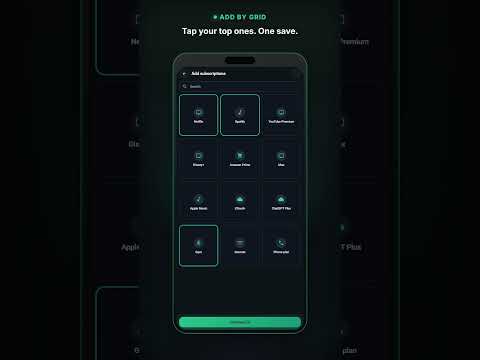
Most people know they pay for streaming, cloud, gym, and a phone plan. What they hate is entering each membership from a blank form. If you also want an app that works without creating an account, Smart Bill Reminder lets you build the list locally on your phone first and log in only if you turn optional backup on.
Why typing every subscription by hand fails
A blank form is fine for one bill. It is painful for five. You stall, skip a service, and the list stays incomplete - which is how forgotten subscription renewals start. Faster path: you add only what you want to track, instead of filling five empty forms.
Tap plus, then Add subscriptions
- Tap +.
- Choose Add subscriptions (not New Bill).
- Select the services you pay for.
- Set amount and billing day.
- Save. Several different memberships land in one go.
Free users can add different subscriptions from the grid. You are not forced through a sign-up screen to start.
What you get after one save
Each added subscription gets a first payment marked as paid, so the next due date shows up right away. You track recurring charges you add yourself - the list stays on your phone. If you want to check you did not miss one, see also how to find forgotten subscriptions.
How this fits everyday bill tracking
The grid is a fast start for memberships and recurring payments. New Bill covers one-off utilities or rent. Due-date reminders: bill reminder before the due date. With Premium, the app spots price hikes, reminds you before cancel deadlines, and helps find unused subscriptions. That is separate from adding several at once from the grid.
Quick answers
Do I need to connect my bank to add subscriptions?
No. You tap services you already know and track bills you add yourself. The app does not log into your bank.
Can I add several different subscriptions in one save?
Yes. Tap +, choose Add subscriptions, select services, set amount and billing day, save. Free users can add different subscriptions this way.
Is the full subscription audit included when I use the grid?
The grid builds your list of recurring payments and sets the next renewal date right away. With Premium, the app spots price hikes, reminds you before cancel deadlines, and helps find unused subscriptions.
Tap what you pay for. Add several at once. Then catch subscription renewals before they renew.
Also see: forgotten subscriptions without a bank login.