
REMINDERS · Mark paid
Mark a Bill Paid from the Notification on Android
Rent, internet, or an installment already paid at the bank, and the bill reminder still sits in the shade. Tap Mark as Paid on that reminder to update the on-device status without opening the bill screen. This does not pay the provider.
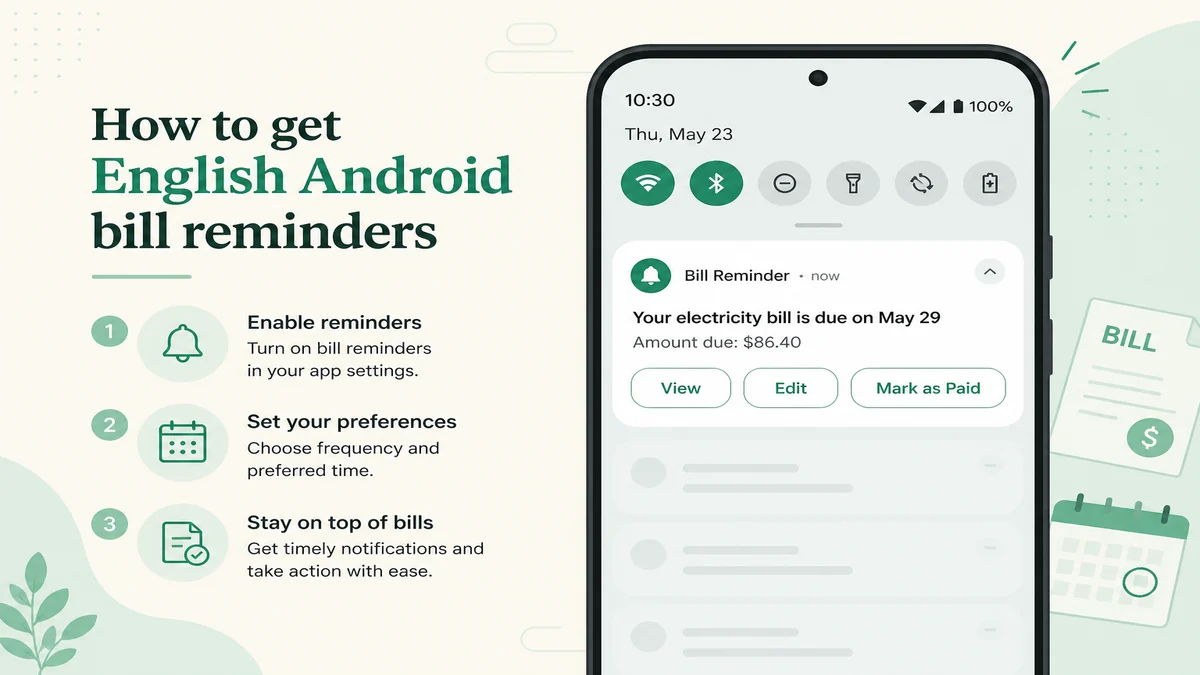
Find Mark as Paid on the bill reminder
When an unpaid bill enters the due-soon or due-today window, Android can show a bill reminder. Pull down the notification shade and look at that reminder.
On the bill reminder you get three actions:
- View opens the bill in the app.
- Edit opens the bill editor in the app.
- Mark as Paid updates status from the shade in the background.
Expand the notification if your lock screen or OEM hides the actions until you do. Mark as Paid is available on Free; there is no Premium gate on this action.
For a short demo of the same job, see the Mark as Paid from the notification video.
Mark paid when the reminder arrives
What happens when you tap Mark as Paid
Tapping Mark as Paid sets that bill’s paid status on your phone and dismisses that reminder. Later reminder checks skip that paid bill.
It does not send money to the provider, bank, or card. It does not confirm payment with anyone. It does not create the next occurrence in a series. Only this bill entry is marked paid; other dates stay as their own entries.
What you need before the actions appear
- Allow notification permission (required on Android 13+ so reminders can show).
- Keep bill reminders turned on in the app settings, with your reminder time set.
- Have an unpaid bill in the due-soon or due-today window (defaults: a few days early, then due day).
If you still need to set how many days before the due date the reminder fires, use the bill reminder before the due date guide. Enabling notification permission in detail is a separate how-to (coming later); for now grant permission in system settings when Android asks.
Limits: widget, other notification types, series
You cannot mark paid from the bill reminder widget. The widget opens the bill or app; it does not expose Mark as Paid.
Subscription-audit reminders and warranty notifications do not offer Mark as Paid. Only the bill reminder path shows View, Edit, and Mark as Paid.
Marking paid does not auto-advance a series. Future dates remain separate unpaid entries until you handle them.
Quick answers
Does Mark as Paid pay my provider or bank?
No. It only updates the bill’s paid status on your device and dismisses that reminder.
Why don’t I see Mark as Paid on the notification?
Check notification permission, in-app bill reminders, and that the bill is unpaid in the due-soon or due-today window. Expand the shade on lock screens that hide actions. Widget, warranty, and subscription reminders do not have this action.
Does tapping Mark as Paid create next month’s bill in a series?
No. Only this bill entry is marked paid. Other dates stay as their own entries.